
Google Is Bringing Live Voice AI to Docs, Gmail, and Keep
Google is expanding Gemini’s live voice capabilities across more of its productivity apps, allowing users to interact with AI through natural, real-time conversations.
Google is continuing to push Gemini deeper into its everyday productivity tools.
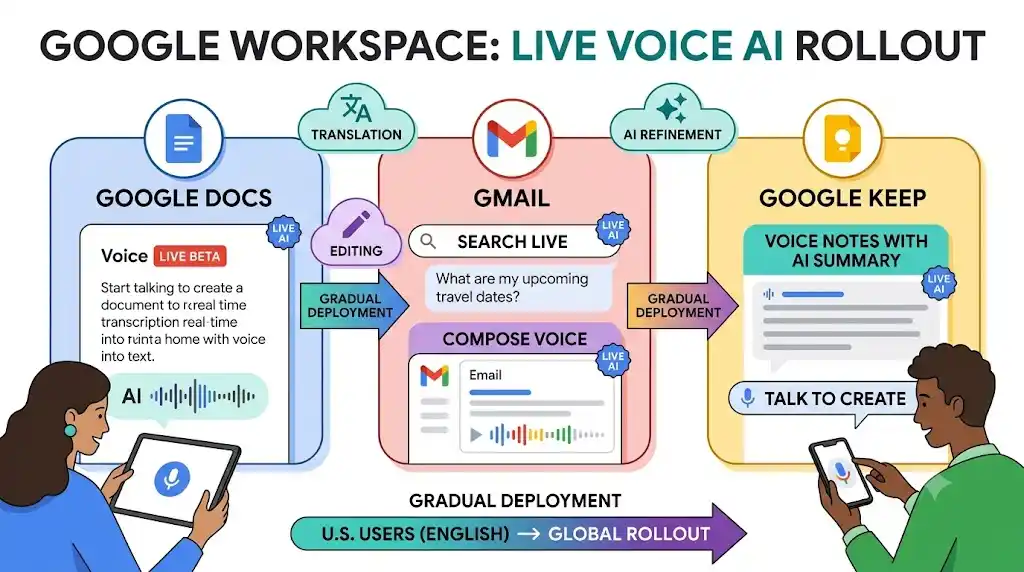
The company has started rolling out Gemini Live support to more Google apps, including Google Docs, Gmail, and Google Keep.
The move could make it easier to interact with Google’s AI assistant without constantly typing prompts.
Instead, users can speak naturally and have a back-and-forth conversation with Gemini while working inside supported applications.
Gemini Live Is Coming to More Google Apps
Gemini Live is designed to make conversations with AI feel more natural.
Instead of sending one prompt and waiting for a response, users can talk to Gemini in a more fluid conversation.
Google has already made Gemini Live available in several parts of its ecosystem.
Now, the company is extending the experience to productivity applications such as Docs, Gmail, and Keep.
That could be particularly useful for people who already spend much of their day inside Google’s apps.
Gemini Live in Google Docs
Google Docs is one of the most obvious places where live voice interaction could be useful.
When working on a document, users could potentially talk through ideas instead of stopping to type every instruction.
For example, someone writing a report could discuss what they want to change and ask Gemini for help developing an idea.
Voice interaction could also make brainstorming easier.
Instead of writing a detailed prompt, users can explain what they’re trying to accomplish naturally and refine the result through conversation.
Gmail Could Become Easier to Manage
Email is another area where voice-based AI could be useful.
Gmail users deal with everything from short personal messages to lengthy professional conversations.
Gemini Live could provide a more conversational way to work with email.
Users could explain what they’re looking for, ask questions about an email, or discuss how they want to respond.
Rather than constructing a perfectly worded AI prompt, users can simply talk through the situation.
This could make AI assistance more accessible to people who aren’t comfortable writing detailed prompts.
Google Keep Gets AI Voice Interaction
Google Keep may seem like a less obvious candidate, but voice AI could be particularly useful for a note-taking application.
People often use Keep to quickly capture ideas, reminders, lists, and pieces of information.
Voice interaction could make that process even faster.
Instead of typing out an idea, users could speak naturally and use Gemini to help organize or develop it.
For example, a user could talk through several ideas and then ask Gemini to turn them into a structured list.
Why Voice AI Matters
Typing is still the primary way most people communicate with AI assistants.
But voice has several advantages.
People can speak much more naturally than they can type, particularly when explaining complicated ideas.
Voice interaction can also be useful when someone’s hands are busy or when they are working on something that makes typing inconvenient.
More importantly, conversation allows users to refine their requests naturally.
Instead of starting over with a new prompt, users can simply say something like:
“That’s not quite what I meant. Make it shorter and focus more on the second point.”
That conversational ability is one of the biggest attractions of live AI systems.
Gemini Is Becoming Part of Google’s Workspace
The expansion of Gemini Live is part of Google’s broader strategy to integrate AI throughout its ecosystem.
Rather than keeping AI inside a separate chatbot application, Google is placing Gemini directly into products people already use.
That includes:
- Gmail
- Google Docs
- Google Keep
- Google Drive
- Google Search
- Chrome
- Android
The goal is to make AI assistance available where people actually work.
Less Prompting, More Conversation
One of the biggest changes brought by Gemini Live is the move away from traditional prompting.
Traditional AI interactions often look like this:
Write prompt → Get response → Write another prompt → Get response
Live voice interaction is different.
It can look more like:
Talk → Respond → Clarify → Talk again → Refine
That may sound like a small difference, but it can make AI feel much more natural.
Users don’t have to carefully plan every instruction before sending it.
Useful for Students and Professionals
The new capabilities could be particularly useful for students and professionals.
Students could use voice conversations to brainstorm essays, discuss study notes, or clarify difficult concepts.
Professionals could use it to organize ideas, prepare documents, manage emails, or think through projects.
People who frequently work across multiple Google applications could benefit the most because Gemini can become a consistent AI assistant throughout their workflow.
Google’s AI Competition
Google isn’t the only company working on conversational AI.
OpenAI, Microsoft, Meta, and other technology companies are all investing heavily in AI assistants capable of natural conversations.
As these systems become more advanced, the competition may shift from simply answering questions to helping people complete everyday tasks.
Google has one major advantage: its enormous ecosystem of productivity applications.
If Gemini can become genuinely useful inside those applications, Google can place AI directly into the workflows of billions of users.
The Future of Productivity Could Be Conversational
The expansion of Gemini Live hints at a future where interacting with software may become increasingly conversational.
Instead of searching through menus or learning complicated features, users could simply tell their software what they want.
For example:
“Help me clean up this document.”
“Find the important emails from this week.”
“Turn these notes into a checklist.”
“Explain this paragraph in simpler language.”
The AI could then guide the user through the process.
Privacy and Accuracy Still Matter
As AI becomes more deeply integrated into productivity applications, privacy and accuracy remain important concerns.
Emails, documents, and personal notes can contain sensitive information.
Users need to understand how their information is processed and what controls are available.
AI-generated suggestions also need to be checked carefully.
Gemini can assist with writing and organization, but users should still review important emails, documents, and other content before relying on AI-generated results.
Final Thoughts
Google’s expansion of Gemini Live into Docs, Gmail, and Keep is another step toward making AI a normal part of everyday productivity.
The biggest advantage isn’t simply that users can talk to Gemini.
It’s that they can potentially have a natural conversation with AI while working inside the applications they already use.
That could make brainstorming, writing, organizing information, and managing communication much easier.
Google’s long-term strategy appears increasingly clear: Gemini isn’t meant to be just another chatbot.
Google wants Gemini to become an AI layer that follows you across its entire ecosystem — from your inbox and documents to your notes, browser, and phone.
And if voice interaction continues to improve, talking to your software may soon feel just as normal as typing into it.
Source: Android Authority