
TL;DR
- A leaked One UI 8.5 build on the Galaxy S25 Ultra shows Samsung’s big design refresh, which includes rounded corners, pill-shaped icons, and bottom bars.
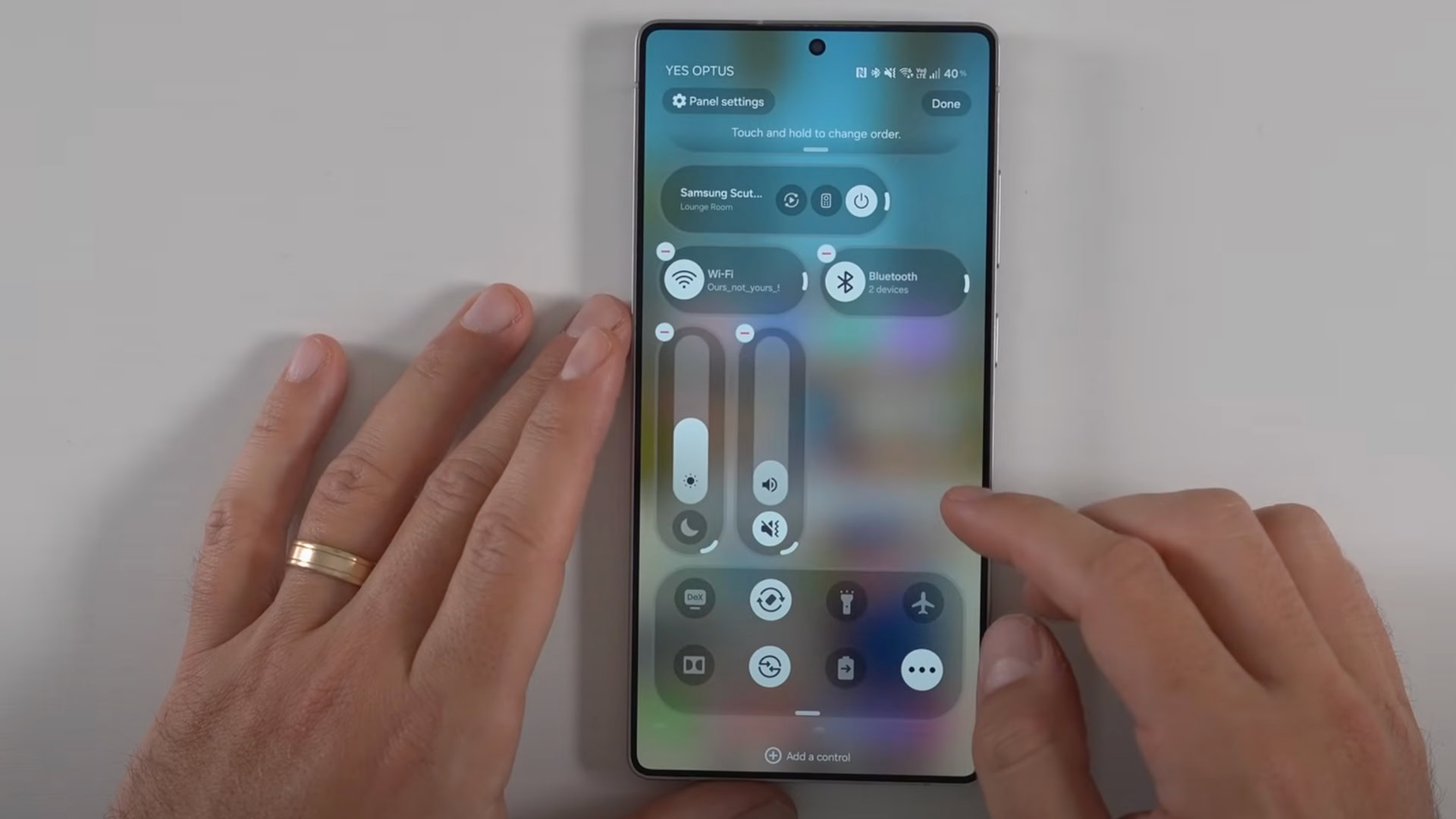
- Sammobile has showcased the update in a hands-on video, giving us a better look at features like the fully customizable quick settings panel, Direct Voicemail in the Phone app, and new tweaks in Gallery, My Files, and Camera.
- More features are expected before launch, with a stable rollout most likely coming alongside the Galaxy S26 series.
Samsung’s next major software update — One UI 8.5 — is starting to take shape, and we can now see how it’s coming together thanks to a new hands-on video posted by folks over at Sammobile. While we’ve also leaked several upcoming One UI 8.5 features exclusively, like the new Privacy Display, NFC-based Quick Share, Automatic Call Screening, and more, and this hands-on doesn’t show any of them, it gives us our clearest look yet at some big UI changes Galaxy users can expect from the update when it arrives.
The statement refers to recent leaks and hands-on previews of One UI 8.5, Samsung’s next major software update, which is expected to debut on the Galaxy Z Fold 7/Flip 7 series or the Galaxy S26 series.
The “big One UI makeover” is a visual overhaul that introduces a softer, more modern design language. The clearest leaked elements of this redesign include:
Key Design Changes Spotted in One UI 8.5:
- Softer, Rounded Aesthetics: The interface uses more rounded corners, extra spacing, and a cleaner overall look, drawing comparisons to Google’s Material 3 and even some iOS design trends.
- Redesigned Navigation Elements:
- Bottom Navigation Bars: Core Samsung apps like the Phone dialer and Gallery are adopting a new look where the main tabs (Dialer, Call Log, Contacts) appear in a pill-shaped dock/container at the bottom of the screen, similar to app design elements on other platforms.
- Settings Menu Tweaks: The search bar is being moved to the bottom of the screen for easier one-handed access. The menu items themselves are more compact with subtitle text being removed.
- Fully Customizable Quick Settings Panel: This is a significant functional change. The Quick Settings (the panel you pull down from the top) is becoming fully modular, allowing users to freely move, remove, or rearrange all the toggles horizontally and vertically.
- Visual Tweaks in Notifications and Status Bar:
- Blurred Notifications: The lock screen is getting a frosted glass/blurred background effect for notifications, enhancing the visual depth.
- Battery Indicator: The traditional battery icon is changing, often disappearing to be replaced by just a percentage readout.
New or Enhanced Features:
While the focus of the “makeover” is visual, the update is also expected to introduce new features:
- Automatic Call Screening: A Pixel-like feature that would allow the phone to automatically handle suspicious or spam calls and show a live transcript.
- Private Display: A feature to limit screen visibility from side angles, increasing privacy from prying eyes.
- NFC-based Quick Share: Faster, more direct file transfers using NFC technology.